ExacqVision Licensing Guide
How to Add More IP Camera Licenses to exacqVision
Need to connect more cameras to your existing exacqVision recorder? You don't replace anything — you simply order additional camera licenses for your server and apply one updated license. This guide walks you through it step by step, no technical background needed.
Step 1
Find your server edition, MAC address and current camera count
Open the exacqVision Client (the program you use to watch your cameras). Click the gear icon (Configuration) in the top-left corner, select your server in the list on the left, click Configure System and open the System tab. Look at the License section on the right — everything you need is there:
- Licensed Edition — Professional or Enterprise (decides which product you order)
- MAC Address — your server's identifier; use the Copy button so there are no typos
- Licensed IP Cameras — how many channels you have now, and how many are used
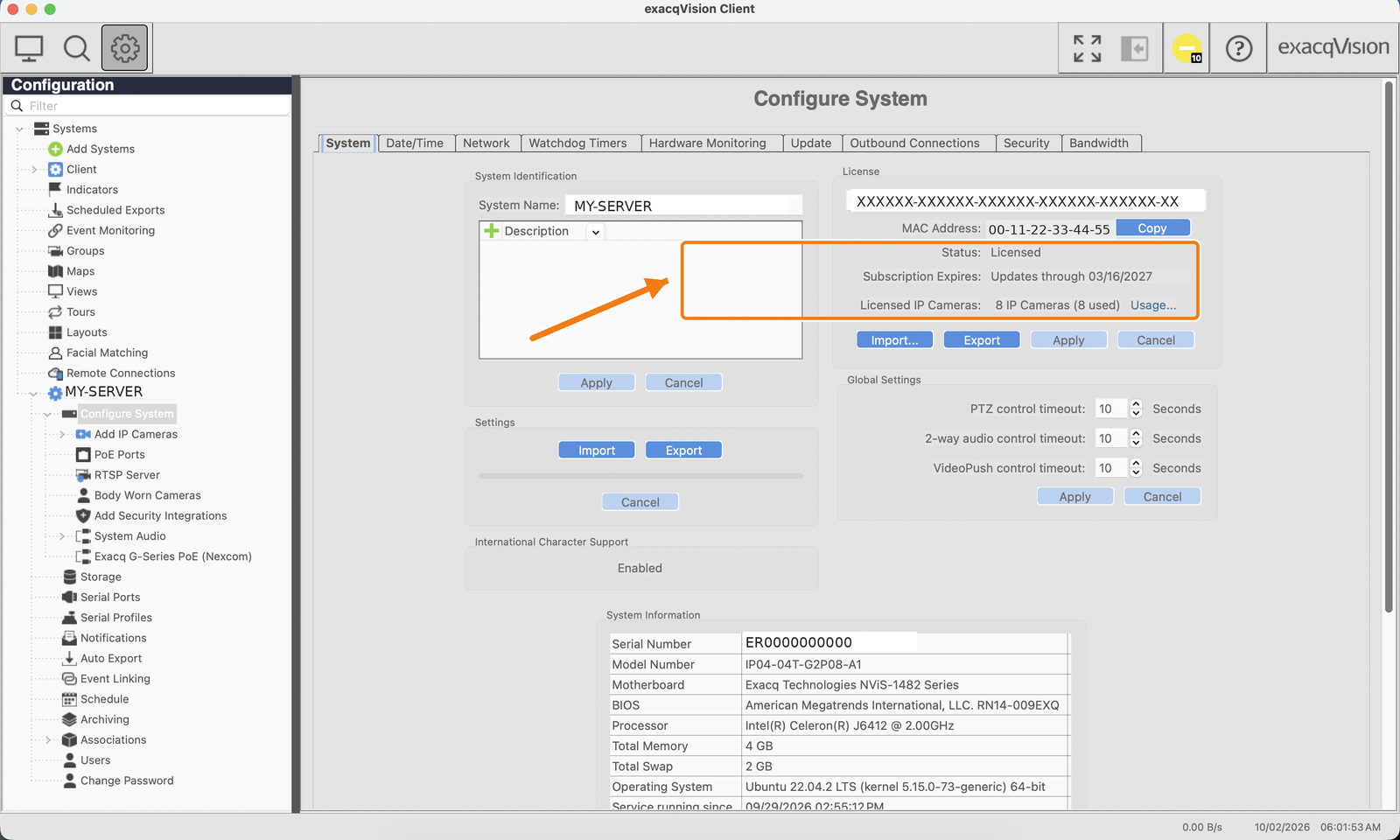
Need help locating it? See our step-by-step guide: How to find the exacqVision server MAC address (with an annotated screenshot) — also available as a one-page PDF.
Step 2
Choose the right product and quantity
The camera license must match your server edition:
One license = one IP camera channel. Adding 4 cameras? Order quantity 4. The licenses cannot be mixed between editions.
Step 3
Check that your new cameras are supported
Camera licensing and camera compatibility are two separate things. Before you buy the cameras themselves, check them in the official camera compatibility tool. If in doubt, e-mail us the camera model and we will check it for you.
Step 4
Place the order
Order directly on this site: open the product page, enter the MAC address you copied in Step 1, the quantity and your e-mail, and choose a payment method (card payment link or bank transfer). We confirm every order by e-mail; a proforma invoice is sent before payment and the final invoice after it.
Step 5
Apply the updated license
Within one business day after payment you receive an updated license for your server — a license key and a .key file covering the new total camera count. Applying it takes a minute and there are three ways to do it (paste the key, import the .key file, or online activation). Follow our illustrated guide:
→ License Activation Guide (with screenshots)
No restart or reinstall is needed and recording continues while the license is applied.
Step 6
Verify and connect your cameras
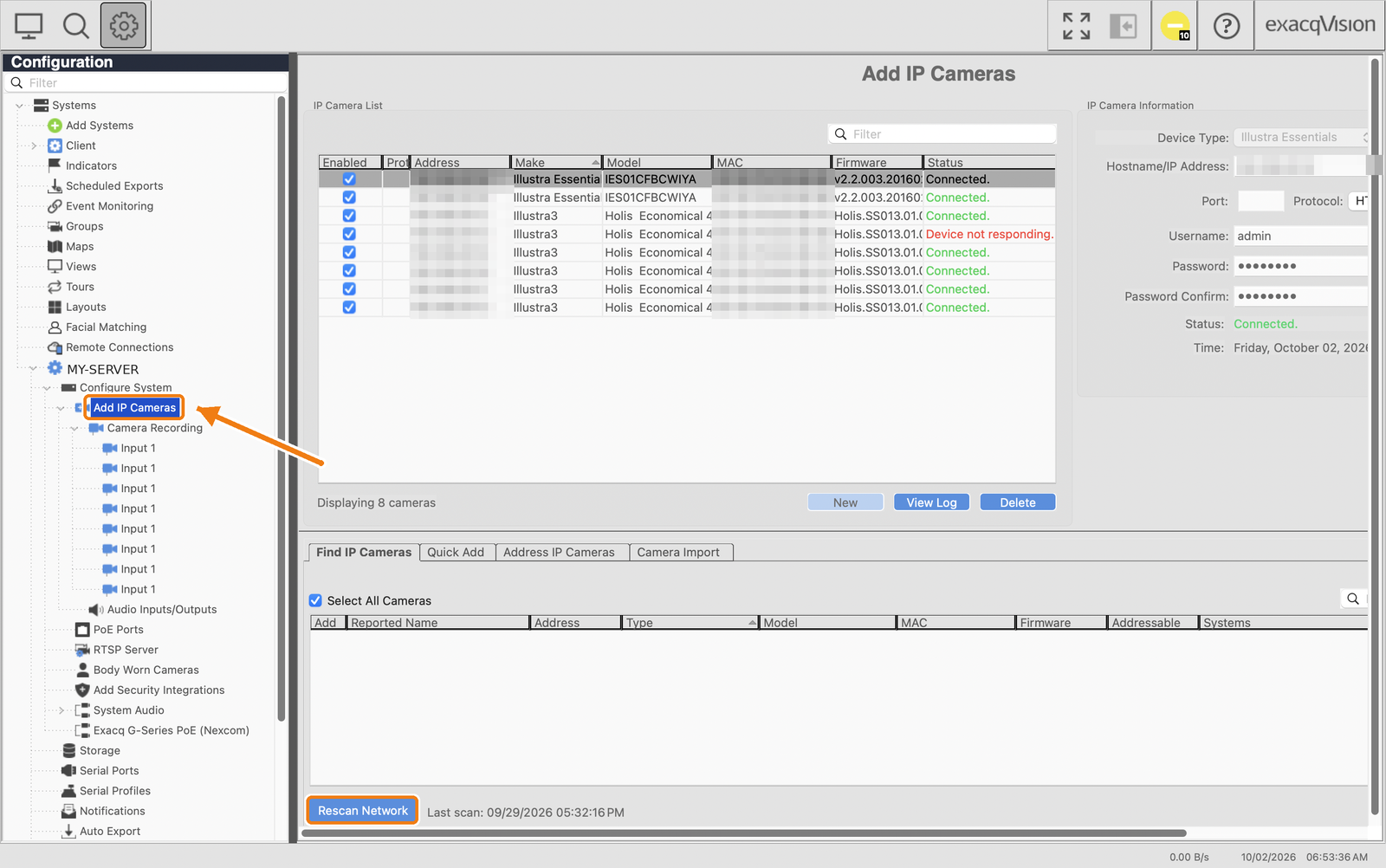
Back in the System tab, check that Licensed IP Cameras now shows the new total. Then add your new cameras under Configure System → Add IP Cameras. Use Rescan Network (or Quick Add) to find the new cameras, tick them and connect. Done.
Frequently asked questions
Can I mix EVIP-01 and EVENIP-01?
No. Use the license that matches the server edition shown in the License section.
Is one license required per camera?
Yes. Each license adds one IP camera channel; order the same quantity as the number of cameras you are adding.
Does adding licenses require a restart?
No. Applying a new license does not require a reinstall or restart, and recording continues during the update.
Will my existing cameras stop working?
No. The updated license covers the full new total; your existing cameras and settings are not affected.
I sent a wrong MAC address. What now?
Write to sales@exacqlicenses.com before applying the license and we will reissue it for the correct server identifier.
Does a camera license include SSA?
New license products may include the software-update term stated in the product description; verify the current catalog and quotation.